WhatsAppChat
Object WhatsAppChat works as a bridge between the python code and the whatsapp chat text
file. Easily load a chat from a text file and work with it using all the power of
pandas.
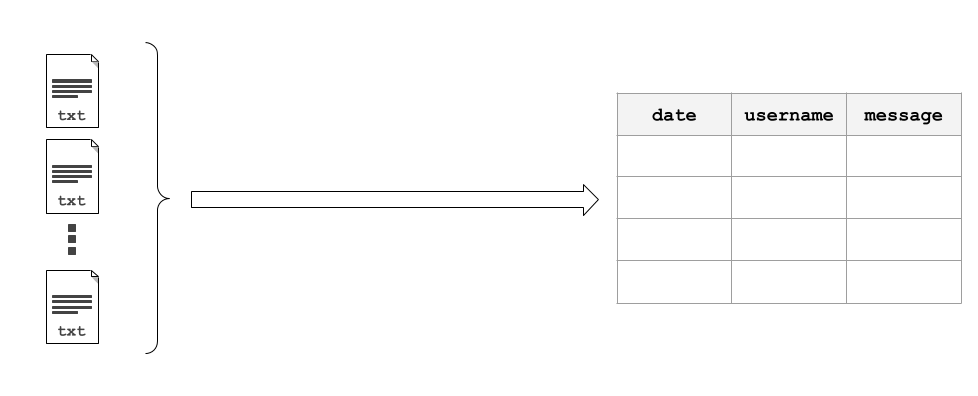
A chat can be loaded from a single source file using WhatsAppChat.from_source
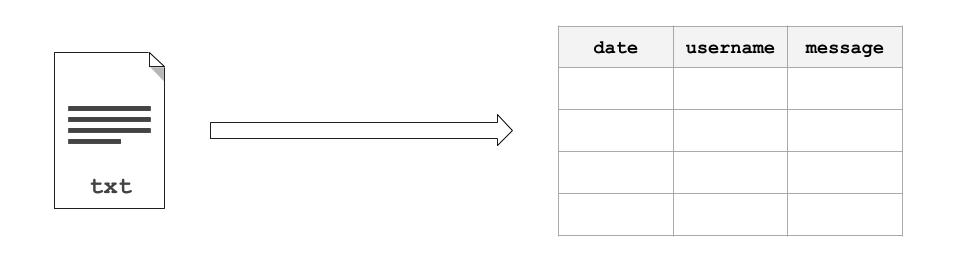
or multiple source files using WhatsAppChat.from_sources
- class whatstk.WhatsAppChat(df: DataFrame)[source]
Bases:
BaseChatLoad and process a WhatsApp chat file.
- Parameters:
df (pandas.DataFrame) – Chat.
Example
This simple example loads a chat using
WhatsAppChat. Once loaded, we can access its attributedf, which contains the loaded chat as a DataFrame.>>> from whatstk.whatsapp.objects import WhatsAppChat >>> from whatstk.data import whatsapp_urls >>> chat = WhatsAppChat.from_source(filepath=whatsapp_urls.POKEMON) >>> chat.df.head(5) date username message 0 2016-08-06 13:23:00 Ash Ketchum Hey guys! 1 2016-08-06 13:25:00 Brock Hey Ash, good to have a common group! 2 2016-08-06 13:30:00 Misty Hey guys! Long time haven't heard anything fro... 3 2016-08-06 13:45:00 Ash Ketchum Indeed. I think having a whatsapp group nowada... 4 2016-08-06 14:30:00 Misty Definetly
Optionally, you can use the argument extra_metadata to add additional metadata to the chat:
>>> chat = WhatsAppChat.from_source(filepath=whatsapp_urls.POKEMON, extra_metadata=True)
>>> chat.name
'Pokemon Chat'
>>> chat.df_system
                 date                                            message
0   2016-04-15 15:04:00     Messages and calls are end-to-end encrypted. N...
>>> chat.df.head()
                 date     username                                            message
0 2016-08-06 13:23:00  Ash Ketchum                                          Hey guys!
1 2016-08-06 13:25:00        Brock              Hey Ash, good to have a common group!
2 2016-08-06 13:30:00        Misty  Hey guys! Long time haven't heard anything fro...
3 2016-08-06 13:45:00  Ash Ketchum  Indeed. I think having a whatsapp group nowada...
4 2016-08-06 14:30:00        Misty                                          Definetly
Attributes:
Chat as DataFrame.
Chat as DataFrame.
Chat end date.
True if the chart is a group.
Name of the chat.
Chat starting date.
List with users.
Methods:
filter_dates([date_min, date_max])Filter chat by date range.
from_source(filepath[, extra_metadata])Create an instance from a chat text file.
from_sources(filepaths[, auto_header, ...])Load a WhatsAppChat instance from multiple sources.
merge(chat[, rename_users])Merge current instance with
chat.rename_users(mapping)Rename users.
to_csv(filepath)Save chat as csv.
to_txt(filepath[, hformat, encoding])Export chat to a text file.
to_zip(filepath[, hformat, encoding])Export chat to a zip file.
- property df: DataFrame
Chat as DataFrame.
- Returns:
pandas.DataFrame
- property df_system: DataFrame
Chat as DataFrame.
- Returns:
pandas.DataFrame
- property end_date: str | datetime
Chat end date.
- Returns:
datetime
- filter_dates(date_min: str | datetime | None = None, date_max: str | datetime | None = None) BaseChat
Filter chat by date range.
- Parameters:
date_min (str, datetime, optional) – Minimum date.
date_max (str, datetime, optional) – Maximum date.
- Returns:
BaseChat – Filtered chat.
- classmethod from_source(filepath: str, extra_metadata: bool | None = None, **kwargs: Any) WhatsAppChat[source]
Create an instance from a chat text file.
- Parameters:
filepath (str) –
Path to the file. Accepted sources are:
Local file, e.g. ‘path/to/file.txt’ or ‘path/to/file.zip’ (iOS).
URL to a remote hosted file, e.g. ‘http://www.url.to/file.txt’.
Link to Google Drive file, e.g. ‘gdrive://35gKKrNk-i3t05zPLyH4_P1rPdOmKW9NZ’. The format is expected to be ‘gdrive://[FILE-ID]’. Note that in order to load a file from Google Drive you first need to run
gdrive_init.
**kwargs – Refer to the docs from
df_from_whatsappfor details on additional arguments.extra_metadata (bool) – This is experimental. If True, additional metadata will be added to the DataFrame. This includes class attributes such as chat.name, chat.df_system (DataFrame with only system messages). Note that this attribute only works on group chats.
- Returns:
WhatsAppChat – Class instance with loaded and parsed chat.
- classmethod from_sources(filepaths: str, auto_header: bool | None = None, hformat: str | None = None, encoding: str = 'utf-8') WhatsAppChat[source]
Load a WhatsAppChat instance from multiple sources.
- Parameters:
filepaths (list) – List with filepaths.
auto_header (bool, optional) – Detect header automatically (applies to all files). If None, attempts to perform automatic header detection for all files. If False,
hformatis required.hformat (list, optional) – List with the header format to be used for each file. The list must be of length equal to
len(filenames). A valid header format might be ‘[%y-%m-%d %H:%M:%S] - %name:’.encoding (str) – Encoding to use for UTF when reading/writing (ex. ‘utf-8’). List of Python standard encodings.
- Returns:
WhatsAppChat – Class instance with loaded and parsed chat.
See also
Example
Load a chat using two text files. In this example, we use sample chats (available online, see urls in source code
whatstk.data).>>> from whatstk.whatsapp.objects import WhatsAppChat >>> from whatstk.data import whatsapp_urls >>> filepath_1 = whatsapp_urls.LOREM1 >>> filepath_2 = whatsapp_urls.LOREM2 >>> chat = WhatsAppChat.from_sources(filepaths=[filepath_1, filepath_2]) >>> chat.df.head(5) date username message 0 2019-10-20 10:16:00 John Laborum sed excepteur id eu cillum sunt ut. 1 2019-10-20 11:15:00 Mary Ad aliquip reprehenderit proident est irure mo... 2 2019-10-20 12:16:00 +1 123 456 789 Nostrud adipiscing ex enim reprehenderit minim... 3 2019-10-20 12:57:00 +1 123 456 789 Deserunt proident laborum exercitation ex temp... 4 2019-10-20 17:28:00 John Do ex dolor consequat tempor et ex.
- property is_group: bool
True if the chart is a group.
A chat is detected as a group if it has more than 2 users (including the ‘system’). Groups with one person will not be detected as groups.
- Returns:
bool
- merge(chat: BaseChat, rename_users: Dict[str, str] | None = None) BaseChat
Merge current instance with
chat.- Parameters:
chat (WhatsAppChat) – Another chat.
rename_users (dict) – Dictionary mapping old names to new names. Example: {‘John’:[‘Jon’, ‘J’], ‘Ray’: [‘Raymond’]} will map ‘Jon’ and ‘J’ to ‘John’, and ‘Raymond’ to ‘Ray’. Note that old names must come as list (even if there is only one).
- Returns:
BaseChat – Merged chat.
See also
Example
Merging two chats can become handy when you have exported a chat in different times with your phone and hence each exported file might contain data that is unique to that file.
In this example however, we merge files from different chats.
>>> from whatstk.whatsapp.objects import WhatsAppChat
>>> from whatstk.data import whatsapp_urls
>>> filepath_1 = whatsapp_urls.LOREM1
>>> filepath_2 = whatsapp_urls.LOREM2
>>> chat_1 = WhatsAppChat.from_source(filepath=filepath_1)
>>> chat_2 = WhatsAppChat.from_source(filepath=filepath_2)
>>> chat = chat_1.merge(chat_2)
- property name: str | None
Name of the chat.
Returns None if no name could be found. The name is extracted from the username of with the first system message in the chat.
- Returns:
list
- rename_users(mapping: Dict[str, str]) BaseChat
Rename users.
This might be needed in multiple occations:
Change typos in user names stored in phone.
- If a user appears multiple times with different usernames, group these under the same name (this might
happen when multiple chats are merged).
- Parameters:
mapping (dict) – Dictionary mapping old names to new names, example: {‘John’: [‘Jon’, ‘J’], ‘Ray’: [‘Raymond’]} will map ‘Jon’ and ‘J’ to ‘John’, and ‘Raymond’ to ‘Ray’. Note that old names must come as list (even if there is only one).
- Returns:
pandas.DataFrame – DataFrame with users renamed according to mapping.
- Raises:
ValueError – Raised if mapping is not correct.
Examples
Load LOREM2 chat and rename users Maria and Maria2 to Mary.
>>> from whatstk.whatsapp.objects import WhatsAppChat
>>> from whatstk.data import whatsapp_urls
>>> chat = WhatsAppChat.from_source(filepath=whatsapp_urls.LOREM2)
>>> chat.users
['+1 123 456 789', 'Giuseppe', 'John', 'Maria', 'Maria2']
>>> chat = chat.rename_users(mapping={'Mary': ['Maria', 'Maria2']})
>>> chat.users
['+1 123 456 789', 'Giuseppe', 'John', 'Mary']
- property start_date: str | datetime
Chat starting date.
- Returns:
datetime
- to_csv(filepath: str) None
Save chat as csv.
- Parameters:
filepath (str) – Name of file.
- to_txt(filepath: str, hformat: str | None = None, encoding: str = 'utf8') None[source]
Export chat to a text file.
Usefull to export the chat to different formats (i.e. using different hformats).
- Parameters:
filepath (str) – Name of the file to export (must be a local path).
hformat (str, optional) – Header format. Defaults to ‘%y-%m-%d, %H:%M - %name:’.
encoding (str, optional) –
Encoding to use for UTF when reading/writing (ex. ‘utf-8’). List of Python standard encodings.
- to_zip(filepath: str, hformat: str | None = None, encoding: str = 'utf8') None[source]
Export chat to a zip file.
Usefull to export the chat to different formats (i.e. using different hformats).
- Parameters:
filepath (str) – Name of the file to export (must be a local path).
hformat (str, optional) – Header format. Defaults to ‘%y-%m-%d, %H:%M - %name:’.
encoding (str, optional) –
Encoding to use for UTF when reading/writing (ex. ‘utf-8’). List of Python standard encodings.
- property users: List[str]
List with users.
- Returns:
list